
AI University
Enhance Your AI ProgramWith a Hands-On Platform.
Add Seed AI to your AI program as a learning tool. Your students work with real language models on your own servers, in workspaces that show how AI actually works. Your instructors build lessons and labs and set the grading rules. Your administrators keep full control, with every prompt and answer on the record.
Free for your AI students and faculty Apply For AI University- Free For Your AI Program
- Runs On Your Own Server
- Full Oversight and Control
$0
License for your AI Students and Faculty
Free
Remote Installation Support
Yours
Servers, Records and Controls
What Your Students Learn
The Concepts Behind Modern AI,Learned Hands-On.
Every concept is taught with a working tool, on real models running on your servers, so students see what a model does and measure why.
Playground
System Prompts and Chat Template
Write system prompts and see the exact text the model reads, template markers included. Switch to a raw prompt to see why a model loops or answers for both sides when the markers are wrong.
Context Builder
Context Engineering
Build a prompt from instructions, examples, documents and history. Watch the token budget, and run with and without a block to see what it really adds.
Seed AI chat · Agents · Model Lab
Tool Calling and Agents
When your administrators turn tools on, the task plan shows which tool the AI chose for each step and what it sent. Students build agents with their own system prompt, model and knowledge base.
Compare & Arena · Evaluations · Model Lab
Model Testing and Evaluation
Run and compare open-weight models side by side or blind, rank them on a leaderboard built from everyone's blind votes, score them with repeatable test suites and judge-model checks, and run a readiness check on any model.
Playground · Model Lab
Tuning Chat Settings and Model Configuration
Change temperature, Top-P, Top-K and other sampling settings one at a time and see the effect. Compare test settings with the ones chat uses, and find the context size and GPU settings a model needs.
Playground · Benchmarks · Model Lab
GPU and Server Gauges
Watch GPU load and memory while a model runs. Every run reports time to first token, tokens per second and peak GPU memory, and the Model Lab adds temperature, power and clock readings.
RAG Lab
Retrieval (RAG)
Chunk documents, tune overlap, similarity and Top K, and work out whether a wrong answer came from finding, ranking or reading.
Playground · Context Builder · Evaluations
Structured Output and AI Safety
Constrain answers to a JSON schema and learn that a grammar guarantees shape, not truth. Test prompt injection attacks and defenses, and measure them with test suites.
Tokenizer · Context Builder
Tokens and Context Windows
See text as the tokens a model reads, why code and other languages cost more, how much of the context window a prompt uses, and how recall changes across a long prompt.
The AI University Workspaces
See Inside a ModelNot Just Its Answers.
Students work in hands-on workspaces where every setting and the exact prompt a model read are visible and measurable, including:
PlaygroundRun a model with full control of sampling, then see the answer, the exact prompt it read and where the time went.
TokenizerSee text split into the tokens a model actually reads, and compare how two models split the same text.
Compare & ArenaSend one prompt to two or three open-weight models or settings and read the answers side by side, or run a blind arena where students vote before the names are revealed.
Context BuilderAssemble system prompts, instructions, examples, documents and history, and see what each block really adds.
RAG LabAdd documents, tune chunk size and overlap, and see which chunks reached the prompt and why.
EvaluationsWrite test suites with exact-match, regex, JSON schema or judge-model checks, and compare models on report cards.
BenchmarksMeasure time to first token and writing speed on your own server as prompts grow.
LeaderboardModels ranked by the blind arena votes of everyone using AI University on your server.
My RunsEach student's runs from every workspace, searchable, with any two compared side by side.
Model Lab
Model Lab ToolsFor Testing and Comparing
Students run and test models the way the engineers who deploy them do: the open-weight models your program installs, including the ones they choose for their own projects. They compare them side by side, measure them on your own GPU, and check whether each one is ready for real work. Administrators choose which student and faculty roles can use it.
Compare ModelsRun two to four models, or one model with different settings, on the same prompt and see exactly where the answers differ.
ReadinessOne check on any model: is the file what its name says, does it load on the GPU, does it stop cleanly, how fast is it, and does it handle long chats and tools.
Chat SettingsRun a model with your own settings beside the exact settings chat uses, and compare the answers.
Load and MemorySee whether a model fits on your graphics card, what its memory goes on, and the largest context it can hold.
PerformanceBenchmark speed, see how many people a model can serve at once, and check whether the card slows down under sustained load.
Context, Tools and VisionTest whether a model finds a fact hidden in a long prompt, calls tools when it should and reads images, and write your own acceptance suites.
Server ViewThe runtime, each graphics card's temperature, power and clocks, the loaded models and the load logs, with findings ranked by what to fix first.
For Instructors
Lessons To Start With.Your Own Labs and Grading Rules.
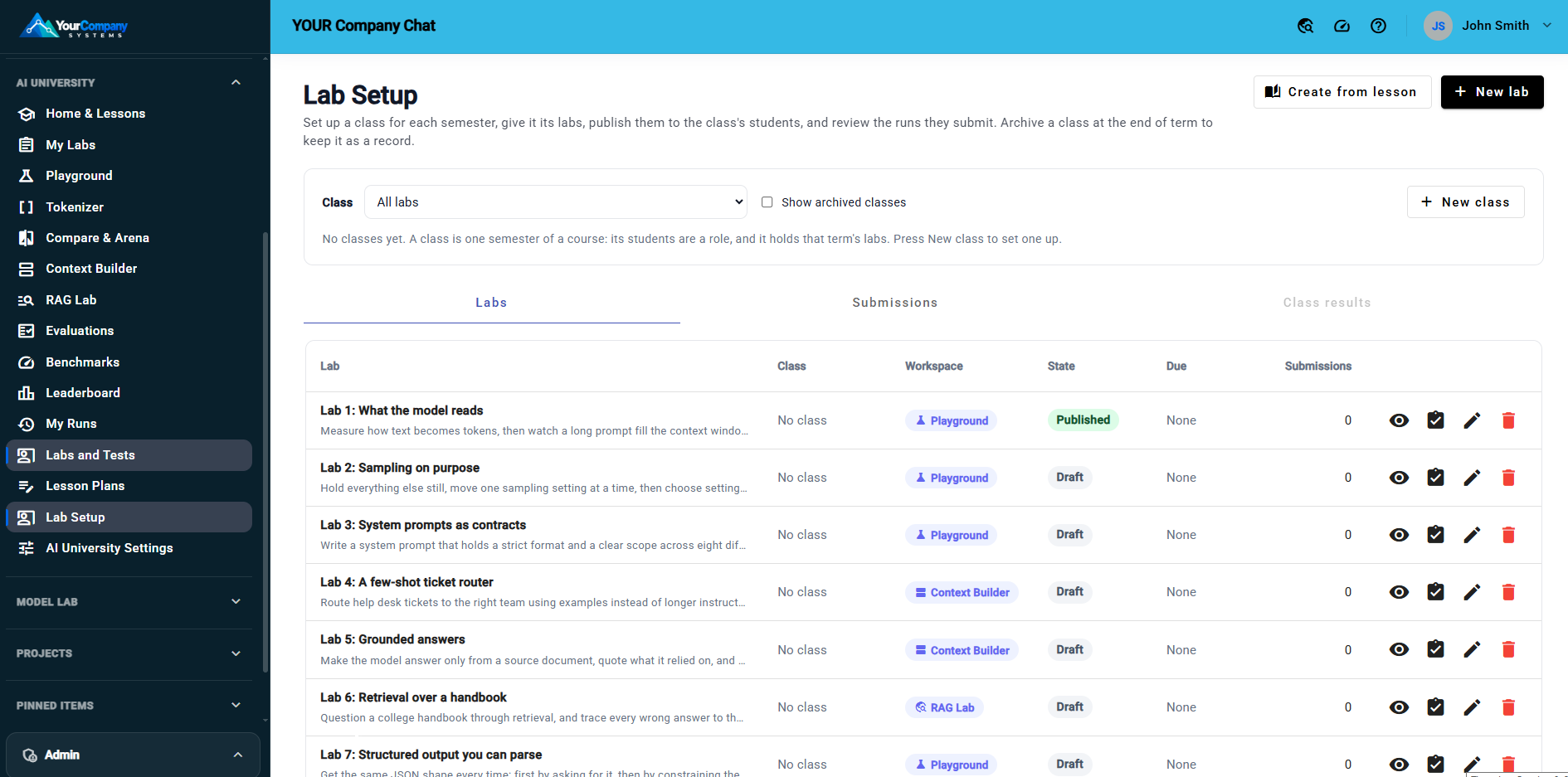
Instructors run the course from Lab Setup and the Lesson Planner. Students never see either.
A Library to Start.Ready-to-run lessons from beginner to advanced, and an optional series of graded labs with rubrics, so your first class can start right away.
Make Your Own.Edit any lesson, write new ones, or have the AI wizard draft one for you to review. Copy any lesson into a draft lab in one step.
Your Grading Rules.Set the allowed models, temperature range and longest answer, or lock the settings. Set due dates, require a written conclusion, and score out of 10 with feedback, or attach a grading suite that scores submissions automatically.
Classes and Records.Classes by term, a grid of every student against every lab, and a CSV export of each student's status, conclusion, scores and feedback on every lab. At the end of term, archive the class as a read-only record and copy its labs to next term's class.
Oversight, Logging and Full Control
Open to Learners.Overseen by You.
Seed AI runs on servers your institution owns and manages, under rules your administrators set.
Every Prompt on The RecordAdministrators can review every prompt and answer in the Prompt Audit, including the full prompt the model read in AI University. It can't be edited or deleted from the application.
Exact Prompts on DemandTurn on Prompt Trace to see the exact text sent to the model and what came back, for the most recent turns.
Live Server ViewLive Monitor shows who is generating and what is queued, and the live GPU gauge shows load, memory, temperature and power for each card.
Logs You Can CheckError logs, license check-ins, and every SQL and MCP connection call are logged for administrators.
Roles and GrantsGrant AI University, the Model Lab, models and tools to roles, then review each user's grants, and where each one came from, on their Effective Access card.
Limits You SetA daily token budget per person, the longest answer, runs at once and the models AI University offers. Class mode keeps a session to the models already loaded on the GPU.
Private Until SubmittedA student's runs are private from classmates and instructors. Instructors see the work a student submits to a lab.
Kept Apart From Your DataThe AI University workspaces can't reach your knowledge bases, databases, email or other connections.
Records You KeepArchive each class with its submitted work, export records to CSV, and choose how long practice runs stay in each student's history.
Updates On Your TermsUpdates are signed and checked before they install, and your IT staff choose whether they only download or install automatically in a maintenance window.
What the program includes
Free For YourAI Program.
Here is exactly what that covers, and what it does not.
free
For Your AI Students and AI Faculty
- The full platform: instructor tools, every workspace, the starter lessons and Model Lab
- A seat for every AI student and AI faculty member you report, with no limit
- Seats renewed every academic year, matched to your headcount
- Remote installation support
- Answers to your questions
Billable, at our 50% education discount
For Everyone Else, And The Hands-On Help You Choose
- Setting up a lab environment for you
- Setting up a production environment for you
- Hardware implementation
- Model support
- Training for instructors, IT staff and administrators
- Course Curriculum Assistance
- Seats for other students and staff
Not Included
Your Own Server Hardware
- A Windows Server
- An NVIDIA GPU
- SQL Server and IIS
Not sure what to buy? We can help you choose and size it.
How Licensing Works
Report. Receive. Renew.Once a Year
01
Report
Tell us how many AI students and AI faculty you have this academic year, by program, in your licensing portal.
02
Receive
We issue the seats to match. Your server picks them up the next time it checks in. No new keys to install.
03
Renew
Before the year ends we email you a reminder. Report next year's headcount and the new seats arrive automatically at your server's next check-in.
What You Need
Your Server With GPUAnd We Help You Install It.
A Windows Server
On your own network, with SQL Server and IIS.
An NVIDIA GPU
24 GB or more for a class. More memory runs larger models and keeps more of them loaded at once.
Our Help
Remote installation support is free. Setting up a lab or production environment for you is billable, at the education discount.
Get Started
From ApplicationTo First Class.
01
Apply
Tell us about your institution, your AI programs and your headcount. It takes about ten minutes and costs nothing.
02
Get Approved
We review every application and email your enrollment key.
03
Install Seed AI
Install it on your server, with free remote installation support from our team.
04
Start Teaching
Turn on AI University, choose the models your classes use, create a class and publish your first lab.
Frequently Asked Questions
Before you apply.
Students enrolled in your AI programs, and the faculty who teach and support those programs. You list the programs when you apply. Seats for everybody else are available at the education discount.
No. You get a seat for every AI student and AI faculty member you report.
Remote installation support is free with your license. If you want our team to set up a lab environment or a production environment for you, that work is billable at the education discount.
A library of starter lessons from beginner to advanced, and an optional graded lab series. Your instructors can edit any lesson, write their own and set their own grading rules.
Yes, in Seed AI's main workspace, once your administrators turn on the knowledge base and tool features. An agent has its own system prompt, model and knowledge base. The AI University workspaces stay separate from tools and your data.
A student's practice runs are private from classmates and instructors. Instructors see the work a student submits to a lab. Administrators can review every prompt and answer in the Prompt Audit.
Yes. Administrators grant the Model Lab to the student and faculty roles they choose, and students test the models those roles can use. Heavy tests, such as benchmarks and readiness checks, run one at a time across the server, so a class takes turns on those.
Update your headcount in the licensing portal at any time. The new seat count reaches your server at its next check-in.
On servers your institution owns and manages. The licensing check sends only basic facts about the server, such as its name, version, hardware and how many users it has. It never sends prompts or student work.
No. Applying is free and we never ask for a card for your AI program. You only pay if you choose discounted seats for other users or one of our services, such as setting up a lab or production environment.
AI University is offered directly by Seed Technologies. Apply on our licensing site and our team will work with you.
AI University
Enhance Your AI Program With Seed AI.
Free licensing and free remote installation support for your AI students and faculty. Questions about eligibility or pricing? Contact Seed Technologies.
Read the AI University Program Terms, Terms of Service and Acceptable Use Policy.